
For not boring you with too many details, we start with the checklist
as first chapter.
All the explanations you find in the subsequent chapters, starting with Why a Persistent Identifier?.
All SP administrators whose SP currently lists the Targeted ID
(eduPersonTargetedID) attribute in the Resource Registry in section
"Requested Attributes and Claims" as required or desired, should carefully process
this checklist in order to prevent future interoperability issues.
Within this chapter, persistent-id refers to the persistent
identifier transferred from IdP to SP either as eduPersonTargetedID attribute
or as SAML NameID format persistent value.
At the SP side, persistent-id is usually configured as environment variable name
to pass the persistent identifier value from the SAML SP to the web applications the SP protects.
persistent-id value really get used or which other identifier(s) get used?
Therefore, check your SP's configuration, the web server configuration as well as the configuration (or source code) of the web applications the SP protects.
Only check the configuration, do not yet change anything in it!
/etc/shibboleth/attribute-map.xml, the id value
defines an attribute's environment variable name.persistent-id is the environment variable name
defined for both alternatives, according to this default configuration from the
Service Provider Configuration Guide:
<!-- The eduPerson attribute version (eduPersonTargetedID, note the OID-style name): -->
<Attribute name="urn:oid:1.3.6.1.4.1.5923.1.1.1.10" id="persistent-id">
    <AttributeDecoder xsi:type="NameIDAttributeDecoder" formatter="$NameQualifier!$SPNameQualifier!$Name" defaultQualifiers="true"/>
</Attribute>

<!-- SAML 2.0 NameID Format: -->
<Attribute name="urn:oasis:names:tc:SAML:2.0:nameid-format:persistent" id="persistent-id">
    <AttributeDecoder xsi:type="NameIDAttributeDecoder" formatter="$NameQualifier!$SPNameQualifier!$Name" defaultQualifiers="true"/>
</Attribute>
⇒ If your configuration uses another name than persistent-id, for the rest of this page
you need to substitute it for the default name.
REMOTE_USER environment variable contain the persistent-id
environment variable name?/etc/shibboleth/shibboleth2.xml in the <ApplicationDefaults>
and possibly in optional <ApplicationOverride> elements, check the sequence of the
identifiers in the REMOTE_USER attribute. It defines the priority for the identifiers listed.REMOTE_USER
environment variable.
REMOTE_USER="persistent-id uniqueID"
If REMOTE_USER contains persistent-id, you need to check in the next step not just for persistent-id but also for occurrences of REMOTE_USER.
persistent-id triplet values stored or do you store only values of another
identifier like uniqueID or even mail?
If you verified, that neither REMOTE_USER nor persistent-id
is in use, no longer request Targeted ID from the IdPs.
First validate your analysis by only changing the SP configuration during a maintenance window, especially if you do not have a test setup readily available to test the changes first.
persistent-id from REMOTE_USER in the file
/etc/shibboleth/shibboleth2.xml
/etc/shibboleth/attribute-map.xml comment out the attribute
mappings for eduPersonTargetedID SAML 2.0 NameID Format like this:
<!-- The eduPerson attribute version (eduPersonTargetedID, note the OID-style name): -->
<!--
<Attribute name="urn:oid:1.3.6.1.4.1.5923.1.1.1.10" id="persistent-id">
    <AttributeDecoder xsi:type="NameIDAttributeDecoder" formatter="$NameQualifier!$SPNameQualifier!$Name" defaultQualifiers="true"/>
</Attribute>
-->

<!-- SAML 2.0 NameID Format: -->
<!--
<Attribute name="urn:oasis:names:tc:SAML:2.0:nameid-format:persistent" id="persistent-id">
    <AttributeDecoder xsi:type="NameIDAttributeDecoder" formatter="$NameQualifier!$SPNameQualifier!$Name" defaultQualifiers="true"/>
</Attribute>
-->
$ shibd -t
shibd process:
$ systemctl restart shibd
REMOTE_USER nor
persistent-id, this modification did not change the behaviour of your SP
protected web applications.

persistent-id values.
If you verified, that REMOTE_USER is used, but does not include persistent-id
nor the persistent-id environment variable is in use, no longer request
Targeted ID from the IdPs.
First validate your analysis by only changing the SP configuration during a maintenance window, especially if you do not have a test setup readily available to test the changes first.
/etc/shibboleth/attribute-map.xml comment out the attribute
mappings for eduPersonTargetedID SAML 2.0 NameID Format like this:
<!-- The eduPerson attribute version (eduPersonTargetedID, note the OID-style name): -->
<!--
<Attribute name="urn:oid:1.3.6.1.4.1.5923.1.1.1.10" id="persistent-id">
    <AttributeDecoder xsi:type="NameIDAttributeDecoder" formatter="$NameQualifier!$SPNameQualifier!$Name" defaultQualifiers="true"/>
</Attribute>
-->

<!-- SAML 2.0 NameID Format: -->
<!--
<Attribute name="urn:oasis:names:tc:SAML:2.0:nameid-format:persistent" id="persistent-id">
    <AttributeDecoder xsi:type="NameIDAttributeDecoder" formatter="$NameQualifier!$SPNameQualifier!$Name" defaultQualifiers="true"/>
</Attribute>
-->
$ shibd -t
shibd process:
$ systemctl restart shibd
persistent-id,
this modification did not change the behaviour of your SP protected web applications.
persistent-id values.
Note: If your SP is a busy one with many users logging in all around the clock, you should properly plan a maintenance window to apply this change, especially if you do not have a test setup readily available to test and validate the changes first.
/etc/shibboleth/attribute-map.xml, modify the id value
for the eduPersonTargetedID attribute to targeted-id and
leave the id value for the SAML 2.0 NameID Format unchanged:
<!-- The eduPerson attribute version (eduPersonTargetedID, note the OID-style name): -->
<Attribute name="urn:oid:1.3.6.1.4.1.5923.1.1.1.10" id="targeted-id">
    <AttributeDecoder xsi:type="NameIDAttributeDecoder" formatter="$NameQualifier!$SPNameQualifier!$Name" defaultQualifiers="true"/>
</Attribute>

<!-- SAML 2.0 NameID Format: -->
<Attribute name="urn:oasis:names:tc:SAML:2.0:nameid-format:persistent" id="persistent-id">
    <AttributeDecoder xsi:type="NameIDAttributeDecoder" formatter="$NameQualifier!$SPNameQualifier!$Name" defaultQualifiers="true"/>
</Attribute>
/etc/shibboleth/shibboleth2.xml in the <ApplicationDefaults>
and possibly in optional <ApplicationOverride> elements, temporarily modify the
REMOTE_USER attribute by adding targeted-id after persistent-id:
REMOTE_USER="persistent-id targeted-id uniqueID"
$ shibd -tIf successful, restart the
shibd process:
$ systemctl restart shibdThis change did not change the behaviour of your SP protected web applications. However, it ensures, that
REMOTE_USER will never carry duplicated values. Now, your SP is ready for the next steps.
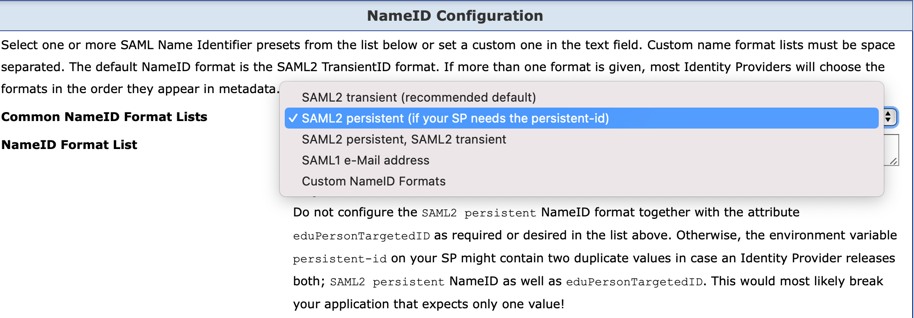
/etc/shibboleth/shibboleth2.xml in the <ApplicationDefaults>
and possibly in optional <ApplicationOverride> elements, revert the temporary change
to the REMOTE_USER attribute by removing targeted-id:
REMOTE_USER="persistent-id uniqueID"
$ shibd -tIf successful, restart the
shibd process:
$ systemctl restart shibd
If you verified, that only persistent-id is in use, you need to schedule a
maintenance window for your service. If not, your SP might pass duplicated persistent-id values
to your web application.
This could happen since IdPs reload about every hour updated metadata files as well
as the attribute filter file. However, IdPs do not load them at the same time. It can take up
to one hour to surely have reloaded both files.
The following changes will affect the SP entry in the metadata file but also your SP's
attribute filter rule.
If your SP is interfederation enabled, IdPs from other federations do only load metadata, but not
an attribute filter file. Therefore, the information these IdPs use will always be consistent.
Coordinate the maintenance window with your Home Organisation's Resource Registration Administrators,
so one of them can approve your submitted change for approval quickly.
After approval, you should wait two hours before you restart your SP again.
persistent-id from the not used REMOTE_USER
in the file /etc/shibboleth/shibboleth2.xml, so that the SP configuration
better reflects the actual usage.$ shibd -tThis change did not change the behaviour of your SP protected web applications.
shibd process to prevent user logins:
$ systemctl stop shibd
shibd process again:
$ systemctl start shibd
<name for the identifier's source>
<name for the identifier's intended audience>
<opaque identifier for the user>
As names, the globally unique SAML EntityID values get used: For the source the IdP's EntityID, for the intended audience the SP's EntityID.
!. See this example:
https://aai-logon.switch.ch/idp/shibboleth!https://attribute-viewer.aai.switch.ch/shibboleth!RxnUFPKVdJ0Awojg1C42k53NfPk=
eduPersonTargetedID attribute was
specified as part of the eduPerson schema.eduPersonTargetedID attribute gets not
transferred as simple string. It uses an XML structure with the three components
introduced above.
<saml2:Attribute
    FriendlyName="eduPersonTargetedID"
    Name="urn:oid:1.3.6.1.4.1.5923.1.1.1.10"
    NameFormat="urn:oasis:names:tc:SAML:2.0:attrname-format:uri">
    <saml2:AttributeValue>
        <saml2:NameID
            Format="urn:oasis:names:tc:SAML:2.0:nameid-format:persistent"
            NameQualifier="https://aai-logon.switch.ch/idp/shibboleth"
            SPNameQualifier="https://attribute-viewer.aai.switch.ch/shibboleth">
            RxnUFPKVdJ0Awojg1C42k53NfPk=
        </saml2:NameID>
    </saml2:AttributeValue>
</saml2:Attribute>
urn:oasis:names:tc:SAML:2.0:nameid-format:persistent (in short SAML NameID).
It exactly matches the XML structure used by the eduPersonTargetedID
attribute.<Subject>
element that is included in the usually encrypted SAML assertion. I.e., the SAML NameID
is not part of the attribute statement.persistent,
but definitely more than can cope with the eduPersonTargetedID attribute.
<saml2:NameID
    Format="urn:oasis:names:tc:SAML:2.0:nameid-format:persistent"
    NameQualifier="https://aai-logon.switch.ch/idp/shibboleth"
    SPNameQualifier="https://attribute-viewer.aai.switch.ch/shibboleth"
    xmlns:saml2="urn:oasis:names:tc:SAML:2.0:assertion">
    RxnUFPKVdJ0Awojg1C42k53NfPk=
 </saml2:NameID>
Note: The values transferred to the SP are the same, whether
they were sent via the eduPersonTargetedID attribute or as SAML
NameID format persistent. That's the good news.
eduPersonTargetedID attribute by the SAML2 standard method
SAML NameID format persistent.eduPersonTargetedID
attribute. It is already marked as deprecated.
eduPersonTargetedID attribute are capable
to provide SAML NameID format persistent.