Services who use Switch edu-ID for authentication are set up and configured as any other service in the Switch edu-ID federation. Follow the guidelines for OpenID Connect and SAML services.
Please check out the description for all identity models on the Identity and Attributes page and its subpages:
If more than one identity can be selected by the user, the Identity Chooser is shown to them.
The "intended audience" setting for a service in the resource registry allows to include or exclude users of an entire organization or type of organization on the level of an IdP. Each Switch edu-ID account may contain one or more linked affiliations. The examples below should illustrate a few typical inclusion/exclusion scenarios.
Note that these intended audience settings are rather coarse access rules. If a user gets through to a service because he or she belongs to the intended audience, the service may still refuse access based on more fine-grained rules evaluating user attributes.
This case especially applies to existing services already supporting the edu-ID federation (formerly SWITCHaai). Such services usually don't need to change their configuration to support the Switch edu-ID IdP.
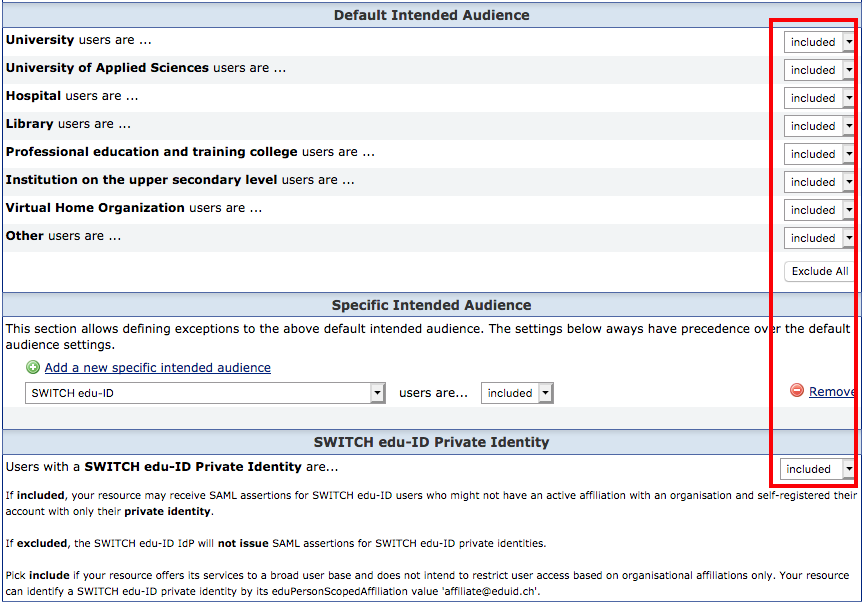
In this configuration scenario, in order to get access to the service, a user has to be a member of an organization. It is irrelevant whether the organization has already integrated edu-ID (edu-ID adopted) or not (only member of the edu-ID federation).
The following users are permitted to access the service:
The following users are excluded from the service:
Typical examples for services with this intended audience:
Setting in the resource registry:
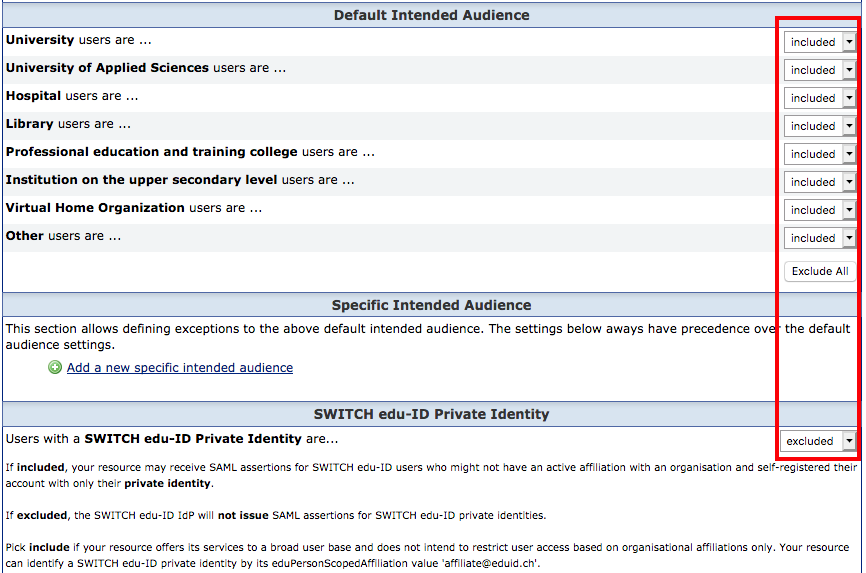
In this configuration scenario, only users who have an edu-ID account get access to the service. Regardless of whether the user has an affiliation with an organization or not, the service recieves the attributes of the personal part of the edu-ID identity.
The following users are permitted to access the service:
The following users are (kind of) excluded from the service:
Typical examples for service with this intended audience:
Setting in the resource registry:
Since the selection of an IdP for the user is not required for login, the discovery service (WAYF) should be deactivated. This can be done with the following setting in the shibboleth2.xml configuration file in the <SSO> Element:
<SSO entityID="https://eduid.ch/idp/shibboleth">
 SAML2
</SSO>
For edu-ID only services, it is recommended to use one of the official edu-ID login button designs.
Optionally, a service can get limited affiliation information by requiring some of the following attributes:
The extended attribute model consists of the personal edu-ID identity, augmented with this additional information about linked affiliations. Such an extended model service is configured the same as with the edu-ID only configuration (see above).
The service can also get additional affiliation information via the backchannel by accessing the Affiliation API. You need to notify the Switch edu-ID Team at eduid-support@switch.ch to get access to these attributes.
To use one or more of the above attributes, you need to add them to the configuration file attribute-map.xml of your Shibboleth SP:
<!-- Switch edu-ID Linked Affiliation -->
<Attribute name="urn:oid:2.16.756.1.2.5.1.1.1029" id="swissEduIDLinkedAffiliation"/>

<!-- Switch edu-ID Linked Affiliation E-Mail -->
<Attribute name="urn:oid:2.16.756.1.2.5.1.1.1031" id="swissEduIDLinkedAffiliationMail"/>

<!-- Switch edu-ID Linked Affiliation Unique ID -->
<Attribute name="urn:oid:2.16.756.1.2.5.1.1.1032" id="swissEduIDLinkedAffiliationUniqueID"/>
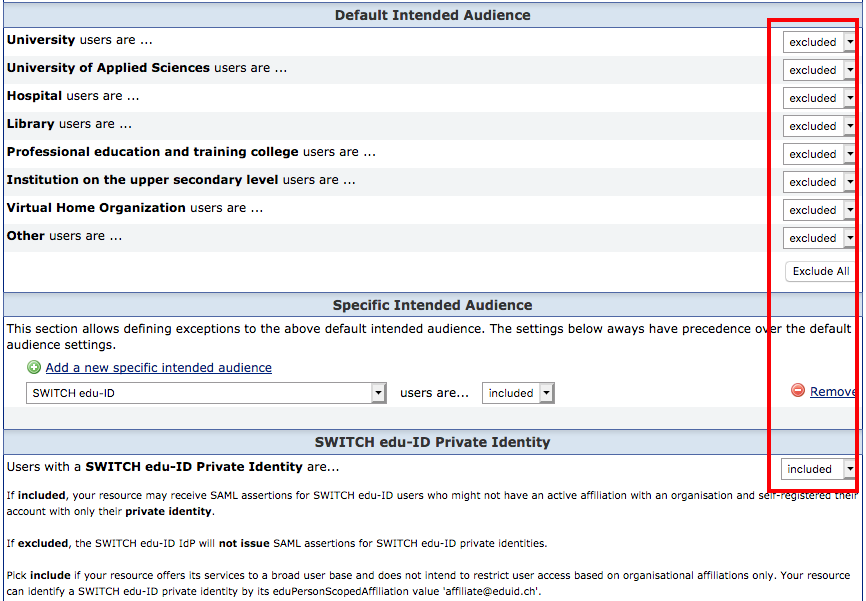
In this configuration scenario, the service accepts users who are members of an organization or have an edu-ID account.
Typical examples for services with this intended audience:
Setting in the resource registry: