
Client Credentials
For confidential clients, some endpoints like the Token Endpoint require client authentication. For that, the client can be configured to use any credential type as described in the OIDC core specifications section 9 and the OAuth2 Authorization framework RFC. Public key authentication offers the best security and is therefore preferred.
Shared client secret
Client secrets for the methods client_secret_basic, client_secret_post and client_secret_jwt can be generated directly in the Resource Registry when registering a service. Alternatively one can also choose to generate a secret locally and copying it into the Resource Registry.
Public key client authentication
For the private_key_jwt method, supported signing algorithms are the es256 (min 256 bits) and rs256 algorithms (min 3072 bits). Generate a public key and provide it to the Resource Registry in one of the following formats:
JWK/JWKS format
JWK (stands for JSON Web Key) is a format for web keys and is specified in RFC7517. Multiple JSON web keys can be provided in a JWKS (JSON Web Key Set). See below for more information on JWKS.
In the Resource Registry you can provide the public part of a JWK or JWKS for client authentication. Here you find some examples on how to generate them.
Example for deriving es256 keys using openssl:
# Generate a private key on the p256 curve.
openssl ecparam -genkey -name prime256v1 -out private.pem

# Print the key to get the public key
openssl ec -in private.pem -text -noout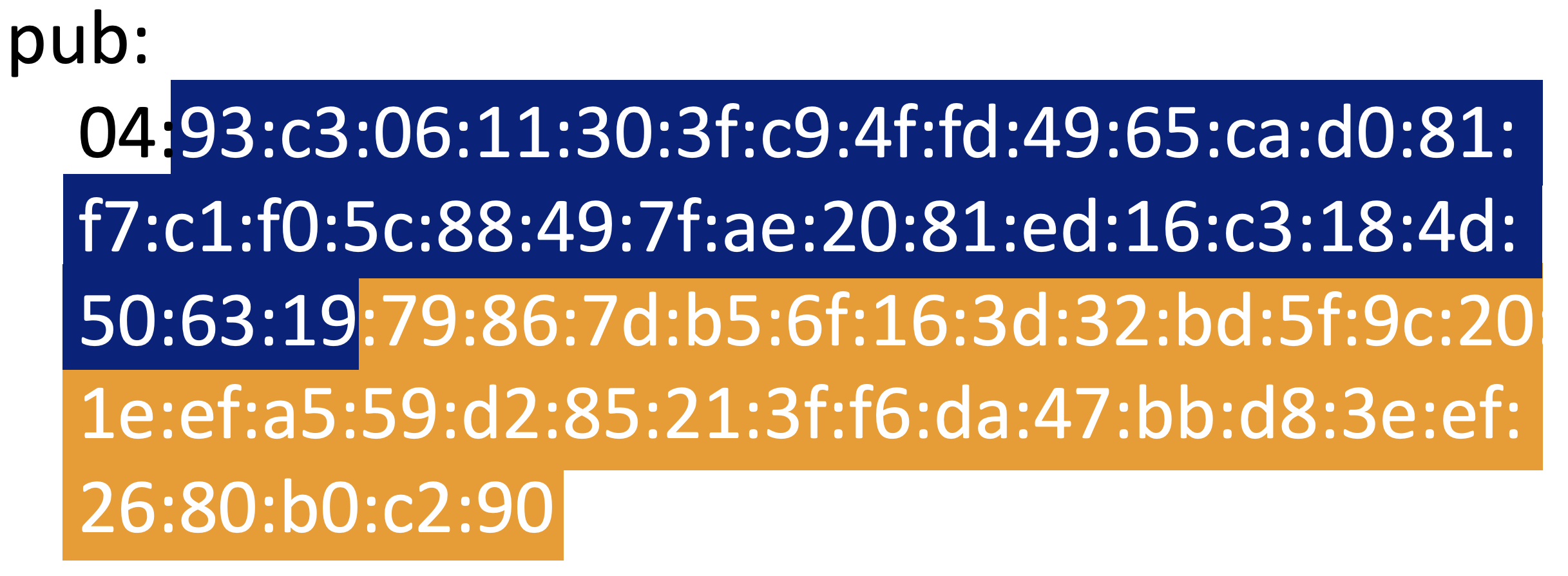
# Converting the HEX public key parts to a base64 representation of the x and y coordinates
#
# Retrieve the x coordinate
echo "The blue part" | xxd -r -p | base64

# Retrieve the y coordinate
echo "The orange part" | xxd -r -p | base64
Provide the derived values as a JSON Web Key (JWK) to the Resource Registry.
{
    "kty": "EC",
    "kid": "my_unique_key_ID",
    "use": "sig",
    "crv": "P-256",
    "alg": "ES256",
    "x": "k8MGETA/yU/9SWXK0IH3wfBciEl/riCB7RbDGE1QYxk=",
    "y": "eYZ9tW8WPTK9X5wgHu+lWdKFIT/22ke72D7vJoCwwpA="
}
Example for deriving rs256 keys using openssl:
# Generate an RSA private key with at least 3072 bits and retrieve the value e.
openssl genrsa -out private.pem 3072

# Get the base64 encoding of the public exponent e, which is AQAB for e = 65337
echo "0x010001" | xxd -r -p | base64

# Get the modulus n
openssl rsa -in private.pem -noout -modulus | sed -e "s/^Modulus=//" | xxd -r -p | base64
{
"kty": "RSA",
"kid": "my_unique_key_ID",
"use": "sig",
"alg": "RS256",
"e": "AQAB",
"n": "vK+80tsVKJAhielXnY3YfJJEjN0yVFgUI9MrVElJE6RIhrOUQ70G609TyozF5RuhtySYpnc8M9e6ZK5zVGiCHJDg2XIyDxMLv1t4o4TMkMdbkwVjFuU5EVZrAeRdRLRTyZrr2554SAYiNK9tyAtwWvygTZO8aPZVL9OLRchVC4HrL0B6KAejtUIalsTMPQIEDNGKyAr73+aLABjsJeWkGOcyHQL6gJgJM5T5T5n/yXQSxw2BtqQB9m8ehthrpHT+hIDndPeRi0U2nhpJiCcYvSRkybLEH2BtRTEp3dXS3E+UQBQWxyxJvk//iooFv5gPc5sEYnds9d3oAh0irkdR7sKEtckB32D4LQ0AYy5wPuoChUKP/zaM0l0uqphQzwTa/VONj9c9/tVQDCGcxRp8WlrVVw+Z20gKzGa2FXXJQoqYUkNpvtpw3QMIG2fP6YpNwsEndp0s32nVMN1XOKV1Mv3f3a8Uf3ip3JKFEV3KlsGjk9KoX5ZhkBooDaaVlFP/"
}JWK Set (JWKS)
If you want to provide multiple credentials, the can be registered in the Resource Registry by combining public keys in the JWKS format. Be sure to assign different key IDs kid for each public key.
Note: A bug in the Shibboleth OIDC plugin forces JWKSets to be ignored completely if one of the keys is invalid.
{
  "keys": [
    {
      "kty": "RSA",
      "kid": "key_1",
      "use": "sig",
      "alg": "RS256",
      "e": "AQAB",
      "n": "vK+80tsVKJAhielXnY3YfJJEjN0yVFgUI9MrVElJE6RIhrOUQ70G609TyozF5RuhtySYpnc8M9e6ZK5zVGiCHJDg2XIyDxMLv1t4o4TMkMdbkwVjFuU5EVZrAeRdRLRTyZrr2554SAYiNK9tyAtwWvygTZO8aPZVL9OLRchVC4HrL0B6KAejtUIalsTMPQIEDNGKyAr73+aLABjsJeWkGOcyHQL6gJgJM5T5T5n/yXQSxw2BtqQB9m8ehthrpHT+hIDndPeRi0U2nhpJiCcYvSRkybLEH2BtRTEp3dXS3E+UQBQWxyxJvk//iooFv5gPc5sEYnds9d3oAh0irkdR7sKEtckB32D4LQ0AYy5wPuoChUKP/zaM0l0uqphQzwTa/VONj9c9/tVQDCGcxRp8WlrVVw+Z20gKzGa2FXXJQoqYUkNpvtpw3QMIG2fP6YpNwsEndp0s32nVMN1XOKV1Mv3f3a8Uf3ip3JKFEV3KlsGjk9KoX5ZhkBooDaaVlFP/"
    },
    {
      "kty": "EC",
      "kid": "key_2",
      "use": "sig",
      "crv": "P-256",
      "alg": "ES256",
      "x": "k8MGETA/yU/9SWXK0IH3wfBciEl/riCB7RbDGE1QYxk=",
      "y": "eYZ9tW8WPTK9X5wgHu+lWdKFIT/22ke72D7vJoCwwpA="
    }
  ]
}
X.509 PEM certificate (public key)
(Information follows)
JSON Web Key Set URL
Instead of providing the keys as JWKS, you can also provide an URL pointing to an endpoint of your client which returns the JWKS. This makes it easier for you if you want to rollover keys for instance.