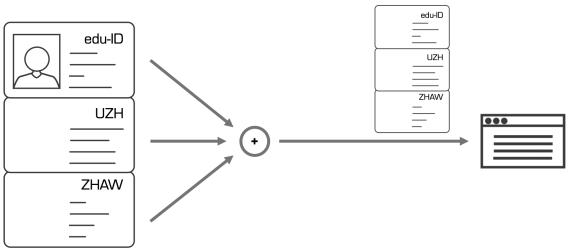
An edu-ID identity always contains a personal identity, which is managed and controlled by the user.
If a user is member of a university, she can add an affiliation (i.e. organisational identity), which is managed by the organisation. If the person is also member of another organisation, more affiliations can be added. The person may end up with the example below, were she has two affiliations from two universities in addition to the personal identity.
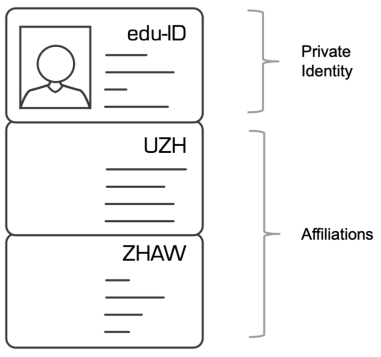
Example of an user with two affiliations.
Many services support the affiliation identity and the personal identity model. Such services can interpret one identity at a time. If a user with several eligible affiliations wants to access such a service, the identity chooser is automatically activated.
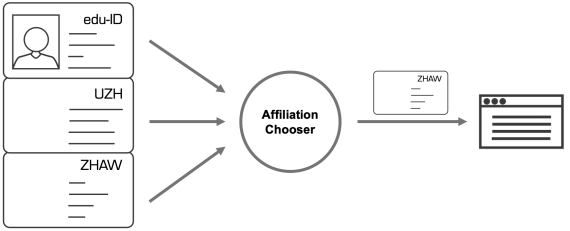
The identity chooser presents the a choice of identities the service accepts. This includes affiliations, but also the personal identity of the user, which is then interpreted by a service like a common affiliation.
After the user has chosen an identity (the affiliation from ZHAW in the example above), the Identity Provider generates an attribute assertion with the affiliation's data and sends it to the service.
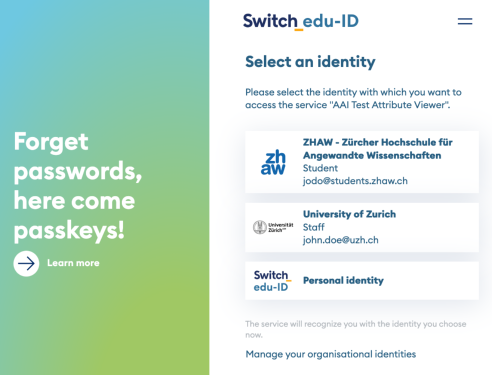
Example of the identity chooser user interface with two affiliations and the personal identity
In many cases a user will not see the identity chooser. The IdP collects all relevant contextual information to present the correct identity choice on behalf of the user, or to reduce the number of options to choose from. The following hints are used by the IdP:
The identity chooser is shown after authentication if the following conditions apply:
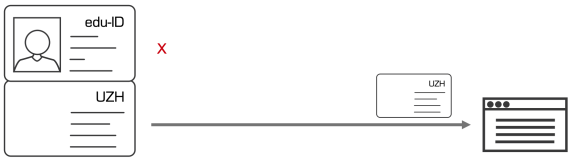
In this most typical case, the user has a single affiliation. The service is configured to require affiliations (affiliation only configuration). The identity chooser is not displayed because the personal identity is not eligible to access the service.
In this case, the user has more than one affiliations. The service is configured to require affiliations (affiliation only configuration). The user chooses the affiliation to be used for the service.
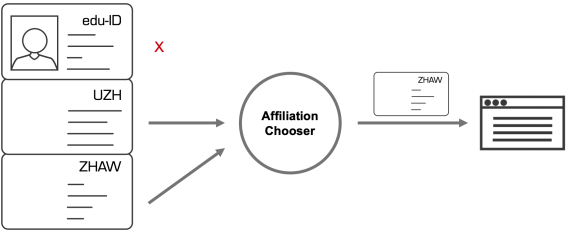
In this case, the service is configured to accept personal identities, as well as affiliations (all users configuration). The user chooses the identity to be used to access the service – either an affiliation or the personal identity.
 Note: Services can define a setting in the Resource Registry to make an automatic choice if the user selected "Switch edu-ID" in the WAYF. This would then not show the identity chooser. The following options for this setting exist:
If a user has exactly one affiliation, this one is automatically selected for login with this setting. The personal identity is only selected if the user has no affiliations.
The use case for this setting is a service that should also be accessible by private persons. However, affiliates of an organization who select edu-ID in the WAYF should not be confused with an identity chooser; so their organisational identity takes precedence and is automatically chosen.
Configure this setting in the Resource Registry > select the service > 7. Intended Audience and Expert Settings > Dropdown "Identity Selection" > "Prefer organisation identity".
In this case, the service supports the personal or the affiliation attribute model. For users who select an organisation in the WAYF, the according affiliation is selected. For users who select Switch edu-ID in the WAYF, no identity chooser is displayed and the personal identity is automatically selected. In this case, the identity chooser is effectively disabled, and the identity choice takes place in the WAYF.
The use case is that some services don't support attribute assertions coming from another IdP than the user was redirected to.
Configure this setting in the Resource Registry > select the service > 7. Intended Audience and Expert Settings > Dropdown "Identity Selection" > "Prefer private identity".
The service requires an affiliation (affiliation only configuration) but the user has no affiliation or not form the required organisation. An error message is then displayed and the user cannot access the service.
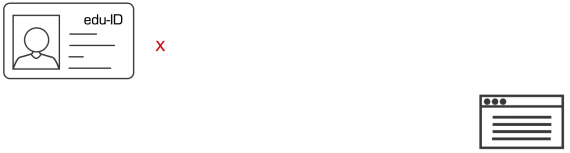
In this case, the service can be accessed with the personal identity only (edu-ID only configuration). No matter how many affiliations the user has, the identity chooser is never displayed.
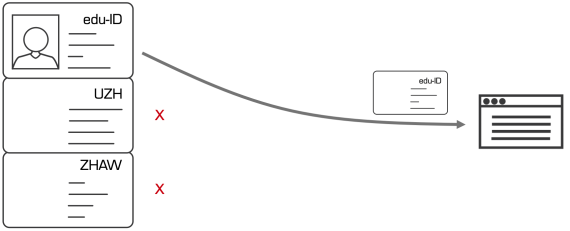
In this case the service supports the extended identity model. Such a service is able to interpret and process the personal part of edu-ID identities, as well as zero, one or more affiliations (extended model configuration). For extended model services, the identity chooser is never displayed.