Interconnecting with Microsoft Environments
The world of Microsoft and edu-ID is constantly changing, so this page will be continuously updated.
|
Contents:
|
 |
Introduction
As organizations increasingly adopt Microsoft services, it's becoming more common to connect Switch edu-ID with existing Active Directory (AD) and Azure AD environments. This allows users to log in to cloud-based applications with a single Switch edu-ID credential, simplifying cross-organizational collaboration and student mobility.
Integrating an external identity provider with Azure AD or AD environments can be accomplished using various protocols, such as SAML 2.0, WS-Federation, or OpenID Connect. However, it's important to understand the differences between legacy and modern authentication methods within Microsoft to obtain the required integration overview.
Authentication methods
| Legacy Authentication |
Modern Authentication |
|
Legacy authentication refers to the traditional authentication methods used in Microsoft environments that rely on usernames and passwords. These authentication methods were designed for on-premises environments and were not optimized for modern security requirements, such as multi-factor authentication, conditional access policies, and device-based authentication. This includes protocols such as POP, IMAP, SMTP, WS-Federation and WS-Trust.
Microsoft is encouraging customers to adopt modern authentication methods that provide stronger security and better user experiences.
|
Modern authentication in Microsoft environments refers to the use of OAuth 2.0, OpenID Connect, and SAML 2.0 protocols for authentication and authorization. These protocols support advanced security features such as multi-factor authentication, conditional access policies, and device-based authentication, and provide a more secure and seamless user experience compared to legacy authentication methods. Switch edu-ID supports SAML 2.0 and OpenID Connect. |
|

|
Best Practice:
Organizations should plan to migrate to modern protocols that are more widely used, such as SAML 2.0 or OpenID Connect. As mentioned, Switch edu-ID supports both protocols. Microsoft provides a well-written documentation how to identify and block legacy authentication. Learn more
|
|

|
Requirement:
Switch edu-ID only supports federation with modern authentication methods, which is also in line with Microsoft's recommendations to upgrade to modern authentication.
|
Key terms of Microsoft:
We generally assume that the reader is familiar with Microsoft's key terms, so we will limit ourselves to a handful of terms that are essential.
- Active Directory
- (Azure) Active Directory (AAD/AD) is a directory service from Microsoft used to manage users, devices, and resources. It runs either in the Azure cloud or locally on an on-premise installation, with corresponding usage tradeoffs.
- AD Federation Services (ADFS) is a service that allows user federation for local on-premise ADs.
- Azure AD Connect is a tool that synchronizes user accounts, groups, and other objects between AD and AAD.
- Device Join
- Azure AD Join allows Windows devices to be managed by Azure AD what enables users to sign in to their devices using Azure AD credentials.
- Hybrid Azure AD Join enables users to sign in to their devices using their on-premises AD credentials.
- Azure AD Users
- Managed User is created and managed directly within Azure AD.
- Federated User is authenticated by an external Identity Provider (IdP) using federation protocols such as SAML.
- Guest User is an external user invited to access resources in a specific Azure AD tenant.
Interconnection Overview
|

|
For a long time, Microsoft neglected universities and NRENs when it came to proposing solutions for multilateral federations. As of June 2023, there is now official documentation on using Microsoft Azure AD with identity federations. Learn more
|
Federating Azure AD with Switch edu-ID
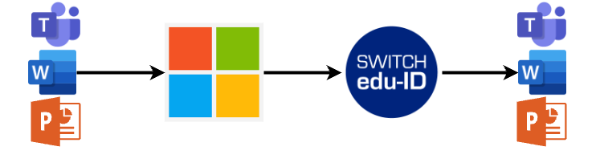
| on-premise AD |
Azure AD |
- Spnego-based Kerberos Authentication
Allow organizational users to login with local on-premise AD. This is an alternative authentication mechanism compared to username/password of Switch edu-ID. Learn more
- Federated ADFS Authentication
Federate Azure AD users using ADFS with Switch edu-ID as authentication method. (supported by Microsoft, no support by Switch. See blog article)
|
- Federated Direct Authentication
A pure Entra ID environment, but also hybrid environments, can federate directly with Switch edu-ID without ADFS.
Learn more
- External Identities
External Identities refer to the ability to extend identity management to external/guest users, such as students and suppliers, to allow them to access applications using their own credentials, i.e. Switch edu-ID.
Learn more (in preparation)
|
Advantages and Disadvantages Federating with Switch edu-ID
Federating Azure AD and AD with an external identity provider using SAML or OIDC allows for seamless and secure access to all resources using modern authentication, including M365 services.
|
|
Disadvantages
|
-
User Centric Authentication:
With federated identity, users can authenticate using their Switch edu-ID credentials, what eliminates the need for separate sets of credentials for organizational and non-organizational services.
-
Single Sign-On (SSO):
Federated identity enables SSO capabilities, which allows users to access multiple cross-organizational applications and resources without needing to repeatedly authenticate. This enhances user productivity and simplifies the login experience.
-
Improved Security:
With federated authentication, users don't need to remember multiple sets of credentials for different applications, reducing the risk of password-related security incidents.
|
-
Dependency on Compatibility:
We must rely on Microsoft to not discontinue support for federated authentication via external identity providers like the Switch edu-ID.
-
Federation of subdomains:
If federated authentication via Switch edu-ID shall only be activated for certain subdomains (e.g. student.uni-demo.ch), there are some caveats one must be aware of. If this is the case for you, let us know and we will evaluate your possibilities.
-
Azure AD joint devices:
One disadvantage of joining devices to Azure AD via Switch edu-ID is the need for permanent internet access which is required to authenticate with Switch edu-ID.
|
Federating Azure AD and AD with Switch edu-ID

Federating Switch edu-ID with Azure AD means that a user from a given organization can use their university's Azure AD tenant credentials to log in to Switch edu-ID.

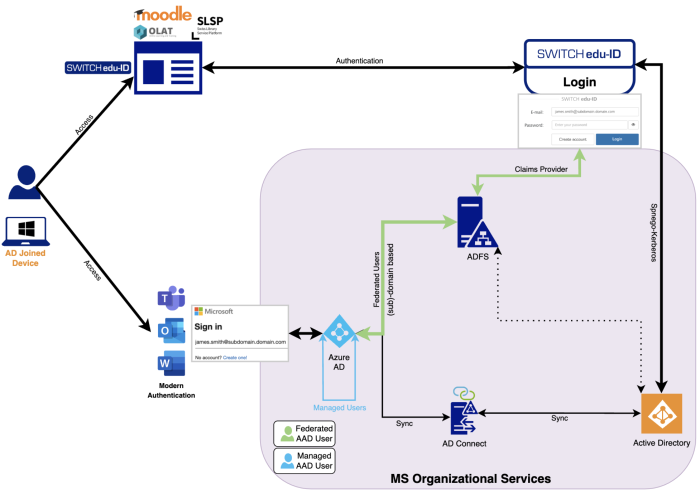
 By federating multiple tenants with Switch edu-ID (e.g., within the higher education community), students can access both tenants with the same credentials, providing ideal conditions for collaboration.