
With Entra ID authentication an organisation can configure users with specific domains for authentication with Switch edu-ID when accessing Microsoft Online Services.
When entering the Email for login, the domain is analysed and, according to the settings of the organisation owning this domain, the user authenticates either against the Entra ID or is redirected to an external login page, in this case the Switch edu-ID login page. The organisation can manage the domains in their tenant each separately, allowing for example to authenticate only a subset of their domains via edu-ID. Note that the authentication of a subdomain is usually bound to the one of its parent domain. Contact us for more detailed information and the prerequisites to separately handle subdomains.
When entering the email for login, the domain/realm is discovered and, according to the settings of the organisation owning this domain, the user authenticates either against the Entra ID or is redirected to an external identity provider (IdP), i.e. Switch edu-ID. The organisation can manage the domains in their tenant each separately, allowing for example to authenticate only a subset of their domains via edu-ID.
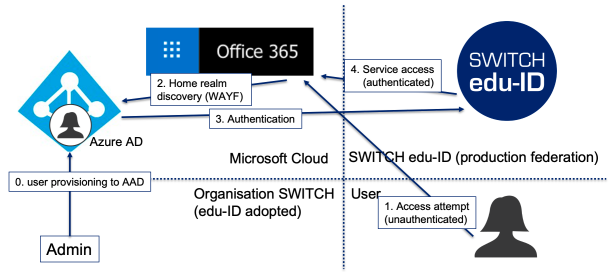
With the chosen solution architecture using SAML Proxies, it is possible to let users authenticate via Switch edu-ID for Microsoft Online Services. In addition, also multiple domains can be configured to be eventually redirected to the same IdP, which Microsoft by default has no mechanism for. The user-centric Single Sign On (SSO) approach of edu-ID allows students to require only edu-ID credentials for all authentication.
 Switch offers a straightforward guidance for the changeover to the federated authentication with edu-ID, providing ready-to-use commands for the configuration in the Powershell.
The following two attributes need to be provided by an organisation (Attribute Provider) either via Push (Affiliation API) or Pull (Attribute Provider API) for each Entra ID enabled user account.
| Attribute Name | Value | Comments |
|---|---|---|
| extAzureADImmutableID urn:oid:2.16.756.1.2.5.1.1.2013 |
ImmutableID matching the user object in Entra ID |
For organisations using AD and AAD Connect: The values must be those that AAD Connect uses as sourceAnchor. By default, AAD Connect stores these values in the Active Directory attribute „ms-DS-ConsistencyGuid“. In this case, the ImmutableID is the base64 encoded value of „ms-DS-ConsistencyGuid“.For organisations not using AD/AAD Connect: The organisations must create suitable values for each Entra ID enabled account and store these values appropriately in their identity management system or user directory (e.g. OpenLDAP). The values must be supplied as part of the affiliations synchronised to the Switch edu-ID. Furthermore, the organiations must synchronise these values with their Entra ID tenant in a suitable way (e.g. via the Graph API or using PowerShell). (The synchronisation to Entra ID is not part of the Switch edu-ID service.) The value must be provided in the format as the PowerShell command „get-msoluser“ returns the attribute „ImmutableID“. Additional information: AAD Connect: Design concepts |
| userPrincipalname urn:oid:1.2.840.113556.1.4.656 |
UserPrincipalName matching the user object in Entra ID |
For organisations using AD: These values can directly be taken from the Active Directory attribute „userPrincipalName“. For organisations not using AD: Since the „UserPrincipalName“ values should correspond to the users' e-mail-addresses per convention, organisations can usually directly use the users' existing primary e-mail addresses as values. Alternatively, they can store the „UserPrincipalname“ as separate attribute in their identity management system or user directory (e.g. OpenLDAP), which might be an advantage in certain cases. Additional information: Active Directory User-Principal-Name attribute |
These attributes are supported by the following Switch edu-ID components:
urn:mace:switch.ch:eduid:scim:1.0:affiliation with the names extAzureADImmutableID and userPrincipalName.extAzureADImmutableID and userPrincipalname.When the prerequisites are met, the last step is to adjust the authentication settings for your Entra ID tenant using Powershell. This step is guided by Switch, providing a set of commands to safely accomplish the changeover.
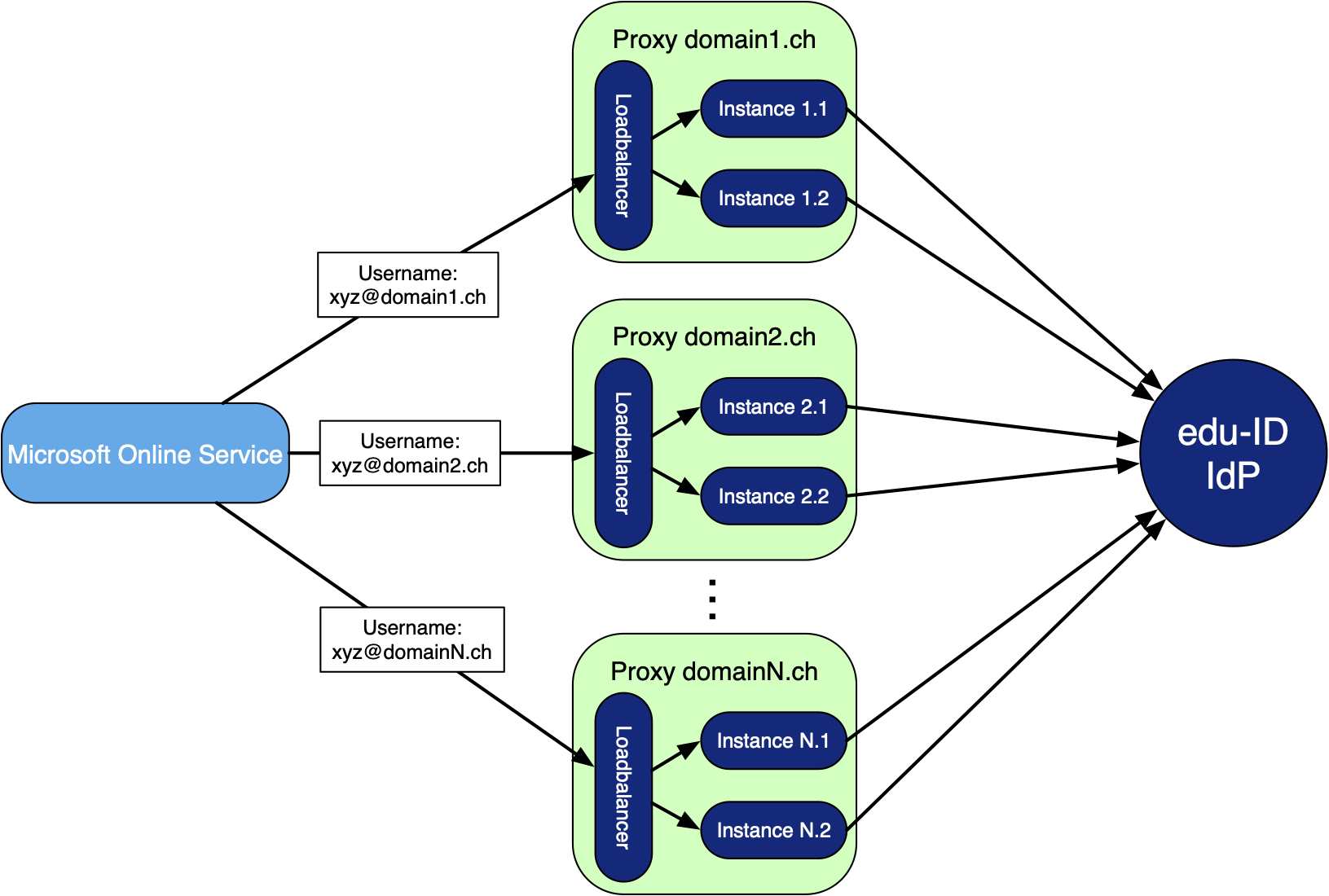
The flow of the SAML request when a user logs on to a Microsoft Online Service. The flow depends on the domain part of the username and eventually ends up at the Switch edu-ID IdP. After successful authentication, a SAML assertion containing userPrincipalName and extAzureADImmutableID is sent back to the requesting service via the same way.
Each proxy consists of two instances, running in docker containers on different machines. In front of them, there is a Load Balancer which ensures the traffic is evenly divided and in case of outage of one instance, only the healthy one is used.
Speaking of healthiness, Switch monitors the proxies, regularly doing automated health checks with alerting when failing, and extracting various metrics and Logs in order to keep track of their status.