
|
To be better able to understand this technical introduction, we strongly recommend you to read
the simple demo and the medium demo first. The content of this introduction is aimed at technicians and therefore quite detailed. |

Figure 1: Situation overview
As shown in Fig. 1 the scenario is the same as in the simple demo and the medium demo but background processes and interacting components are also considered in this introduction.
In the following, it is distinguished between the data sent from the user's web browser to the web server
(GET requests and POST requests)
and the data received by the user from the web server
(redirect responses and data responses).
Some detail information is emphasized using a [DETAIL POPUP] link.
For better readability the data is shown in URL decoded form, e.g. a '://' would be '%3A%2F%2F' in the real data.
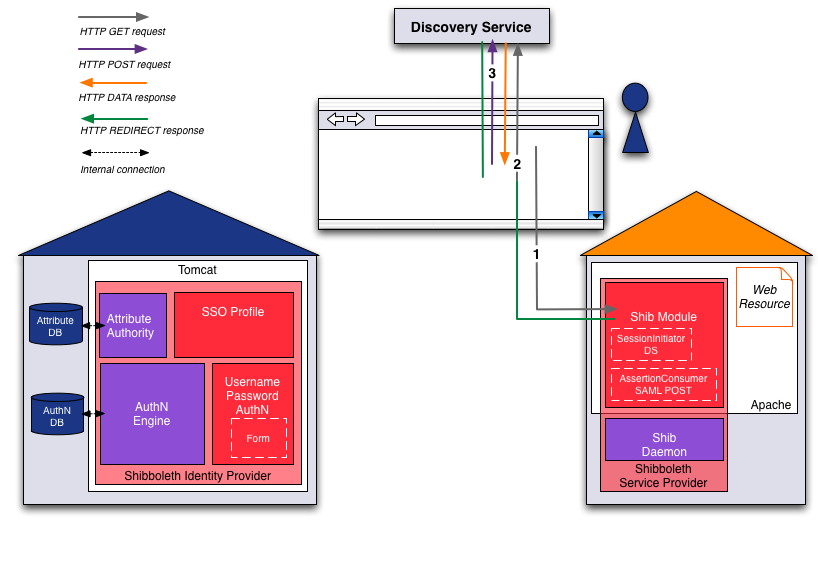
Figure 2: Discovery
GET https://aai-demo.switch.ch/secureBecause https://aai-demo.switch.ch/secure is protected by the Shibboleth Service Provider, it is checked if the user already has a Shibboleth session and therefore was authenticated already. If the user is not authenticated, the web server answers with an HTTP Redirect to the Discovery Service located at wayf-test.switch.ch. Since the Discovery Service server needs to know where to return the user's Home Organization selection to, the relevant information is provided as GET parameter:
302 FOUND (REDIRECT)
  Set-Cookie: _shibstate_64656661756c7468747470733a2f2...
    value=https://aai-demo.switch.ch/secure
    path=/

  Location: https://wayf-test.switch.ch/SWITCHaai/WAYF
   ?entityID=https://aai-demo.switch.ch/shibboleth
   &return=https://aai-demo.switch.ch/Shibboleth.sso/Login?SAMLDS=1&target=ss:mem
GET https://wayf-test.switch.ch/SWITCHaai/WAYF
      ?entityID=https://aai-demo.switch.ch/shibboleth
      &return=https://aai-demo.switch.ch/Shibboleth.sso/Login?SAMLDS=1&target=ss:mem
The Discovery Service answers with the web page that allows the user to select an Identity Provider:
200 OK
  [WAYF DROPDOWN HTML PAGE]
POST https://wayf-test.switch.ch/aaitest/WAYF?entityID=https://aai-demo.switch.ch/shibboleth&return=https://aai-demo.switch.ch/Shibboleth.sso/Login?SAMLDS=1&target=ss:mem

  POSTDATA
    user_idp=https://aai-demo-idp.switch.ch/idp/shibboleth
The Discovery Service sends a redirect to the return destination including the IdP selection:
302 FOUND (REDIRECT)
  Location: https://aai-demo.switch.ch/Shibboleth.sso/Login
    ?SAMLDS=1
    &target=ss:mem
    &entityID=https://aai-demo-idp.switch.ch/idp/shibboleth
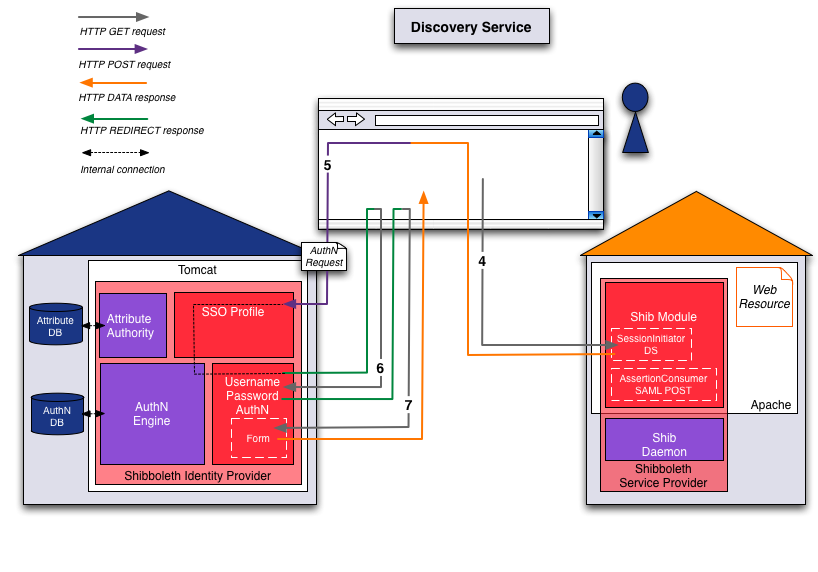
Figure 3: Session initiation and authentication request
GET https://aai-demo.switch.ch/Shibboleth.sso/Login
      ?SAMLDS=1
      &target=ss:mem
      &entityID=https://aai-demo-idp.switch.ch/idp/shibboleth
The session initiator creates an authentication request and returns it within an auto-submit-post-form:
200 OK
  [AUTHN REQUEST POST FORM HTML PAGE]
POST https://aai-demo-idp.switch.ch/idp/profile/SAML2/POST/SSO
  POSTDATA
    RelayState=ss:mem:23e3a3b1268acd89dc226bb1ce0d0c6ba7ecf773
    SAMLRequest=PHNhbWxwOkF1dGhuUmVxdWVzdCB4bWxuczp...
The Identity Provider checks the authentication request, because the user is not authenticated, it sends
a redirect to the appropiate login handler (here: Username/Password):
302 MOVED TEMPORARILY (REDIRECT)
  Set-Cookie: _idp_authn_lc_key
    value=C22C16A197CB9606067A1A577EF5D996
    Path=/idp
    Secure

  Location: https://aai-demo-idp.switch.ch:443/idp/AuthnEngine
GET https://aai-demo-idp.switch.ch/idp/AuthnEngine
  Cookie: _idp_authn_lc_key
    value=C22C16A197CB9606067A1A577EF5D996
The Identity Provider redirects then to the specific username/password web page:
302 MOVED TEMPORARILY (REDIRECT)
Location: https://aai-demo-idp.switch.ch:443/idp/Authn/UserPassword
GET https://aai-demo-idp.switch.ch/idp/Authn/UserPassword
  Cookie: _idp_authn_lc_key
    value=C22C16A197CB9606067A1A577EF5D996
The web server responds with the username/password page:
200 OK
  [USERNAME PASSWORD LOGIN FORM HTML PAGE]
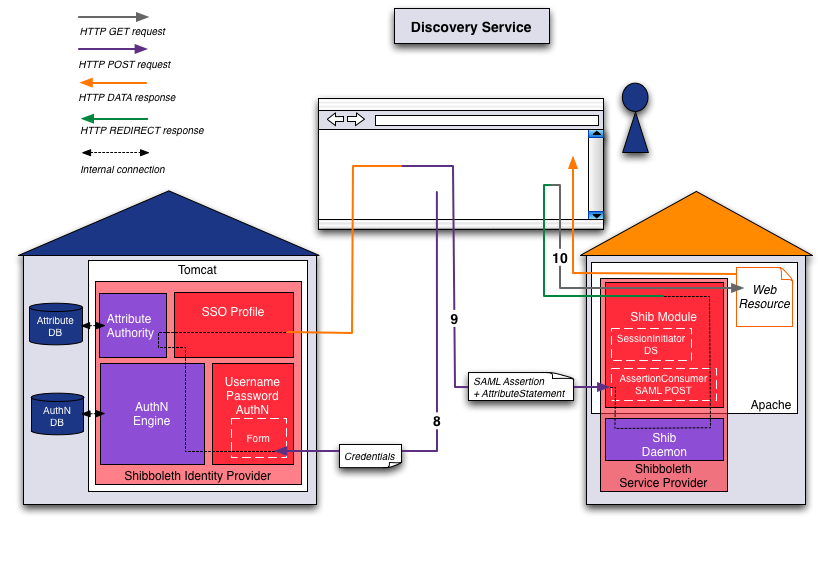
Figure 4: Authentication, attribute statement and access
POST https://aai-demo-idp.switch.ch/idp/Authn/UserPassword
  POSTDATA
    j_username=demouser
    j_password=demo

  Cookie: _idp_authn_lc_key
    value=C22C16A197CB9606067A1A577EF5D996
The Identity Provider's authentication engine verifies the credentials. After the user/principal was sucessfully authenticated,
the attribute authority will perform the attribute resolving and attribute filtering. Then an HTML page is generated which includes a SAML assertion. Because this assertion contains not only an authentication statement but also an attribute statement with the user's attributes, this way of sending the attributes is called "Attribute Push". The assertion is transmitted using an auto-submit-post-form:
200 OK
  Set-Cookie: _idp_session
    value=4m2ETlKYtvbNEmBzVNo3UHLuKSdo3HqTUqAmeZiar94=
    Path=/idp

  [ASSERTION POST FORM HTML PAGE]
POST https://aai-demo.switch.ch/Shibboleth.sso/SAML2/POST
  POSTDATA
    RelayState=cookie
    SAMLResponse=PD94bWwgdmVyc2lvbj0iMS4wIiBlbmNvZGl...

  Cookie: _shibstate_64656661756c7468747470733a2f2...
    value=https%3A%2F%2Faai-demo.switch.ch%2Fsecure
The Service Provider processes the SAML assertion including the authentication and attribute statements. Finally it sends a redirect to the prior requested
ressource, whose URL was stored in the _shibstate cookie:
302 FOUND (REDIRECT)
  Set-Cookie: _shibstate_64656661756c7468747470733a2f2...
    value=
    path=/

  Set-Cookie: _shibsession_64656661756c7468747470733a2f2...
    value=_0b6d4e89d2e9c4481738094f2a2c9de0
    path=/

  Location: https://aai-demo.switch.ch/secure
GET https://aai-demo.switch.ch/secure

  Cookie: _shibsession_64656661756c7468747470733a2f2...
    value=_0b6d4e89d2e9c4481738094f2a2c9de0
This time however, the user is authenticated. To decide whether a user is allowed to access a protected resource, the mod_shib module embedded in the Apache web server examines the Shibboleth access rules and tries to match them using the user's attributes.
In this demo, the following access rules is used (any authenticated user is able to access):
# content of secure/.htaccess
AuthType shibboleth
ShibRequireSession On
require valid-user
The Service Provider returns the content of accessed page:
200 OK
  [RESOURCE HTML PAGE]
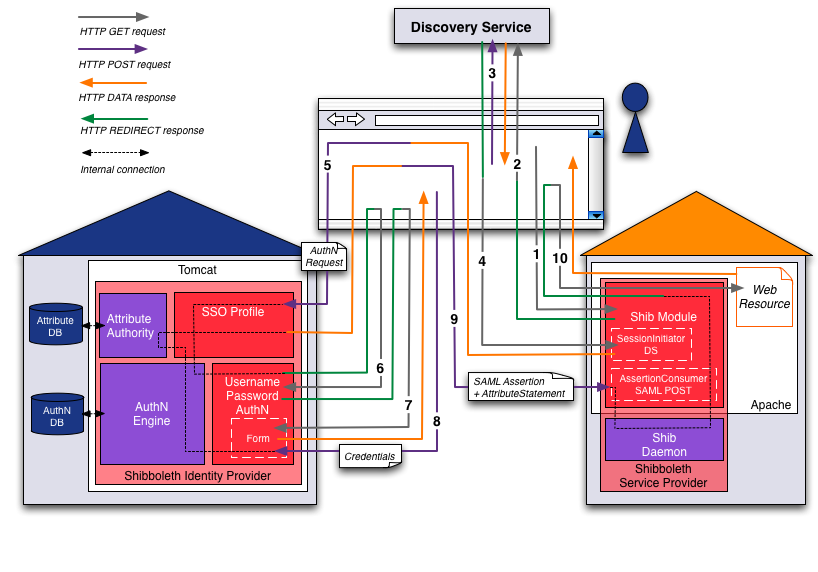
Figure 5: The whole login procedure
Subsequent accesses to the Service Provider are granted directly until the Shibboleth session timeout requires a fresh authentication.
| Take a look at the expert session add-on if you would like to see the flows when SP or IdP session is already existent. |
| Take a look at the medium demo if you would like to see this login procedure in action. |