
There are multiple approaches how an organizational user identity can be linked to the (personal part of the) edu-ID identity.
These linking methods are currently supported by Switch edu-ID:
The link for a user is established if:
After linking the organizational and the edu-ID identity, the edu-ID service creates a current organizational affiliation. The attributes in the affiliation and the organizational identity are kept in sync - with the organization being the provider. Switch edu-ID offers multiple methods to manage and synchronize affiliations.
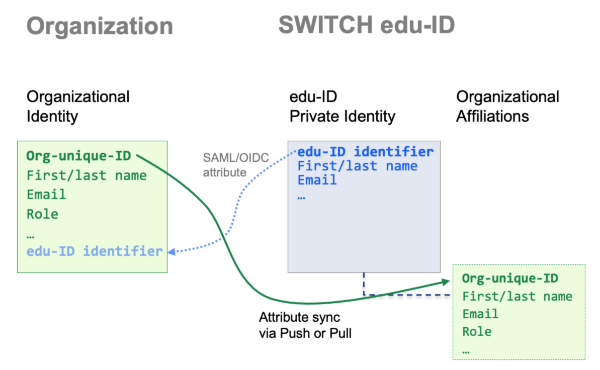
Organizational and edu-ID identity after linking
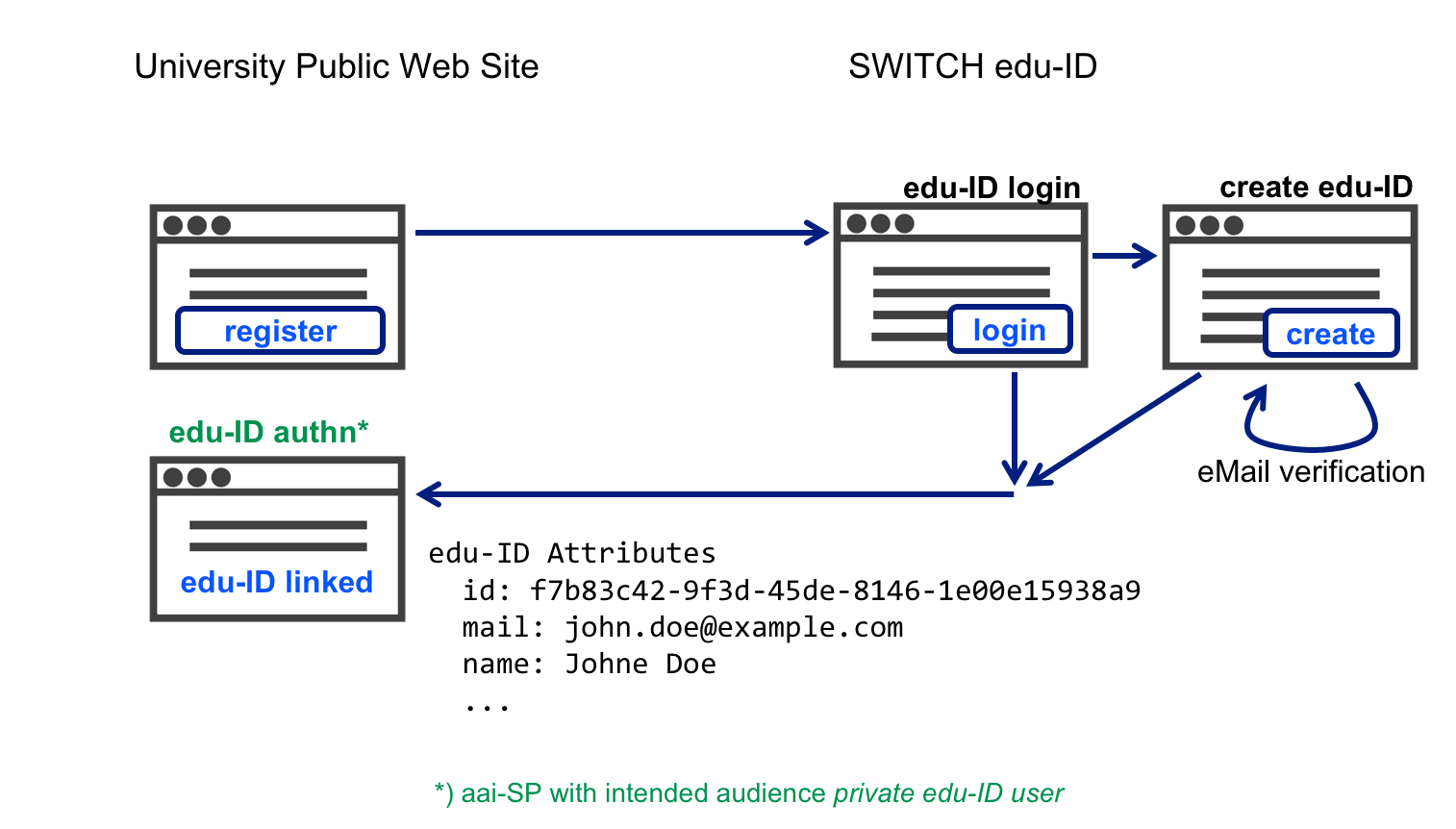
With this approach, the organization offers a public registration web form. The basic idea is to make sure users have an edu-ID before they register at the university.
On a public information page, the user is asked to proceed to an edu-ID-protected registration page hosted by the organization. Users gains access to that page by authenticating with their edu-ID. If the user does not already have an edu-ID, it can be created on the fly.
As a result the user is redirected to the registration page and the organization gets the user's edu-ID identifier which can be stored in the local directory.
Later, if/when the user has been admitted, the organization informs the edu-ID service about the new affiliation by calling the edu-ID affiliation REST API.
Check these details about the registration page.
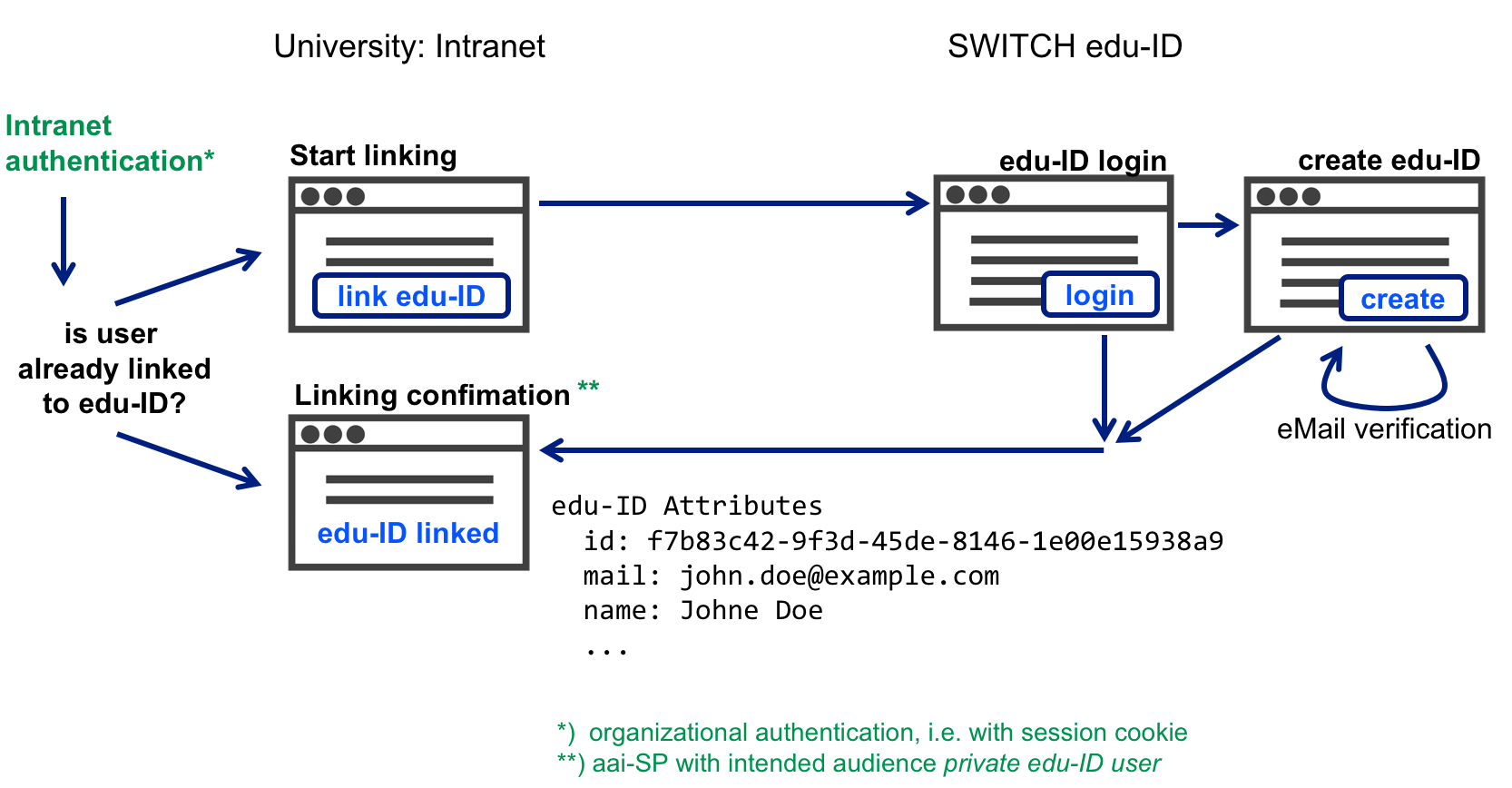
In this approach, the organization operates a linking service, which is a web page. The basic idea is to have a user authenticate at the organization, and then also at edu-ID. If both authentications succeed the link can be established.
The user is asked to go to a local protected web page hosted by the organization. The user accesses that page by authenticating against the local directory. If the edu-ID identifier is known for the user, the link has already been established and the user can stop. Otherwise, the user is informed that the link is missing and that it should be established by authenticating with the edu-ID. Users without an edu-ID can create one on the fly.
As a result the organization gets the user's edu-ID identifier which can be stored in the local directory. To complete the bidirectional link, the organization informs the edu-ID service about the new affiliation by calling the edu-ID affiliation REST API.
The detailed process of an organizational linking service is described here.
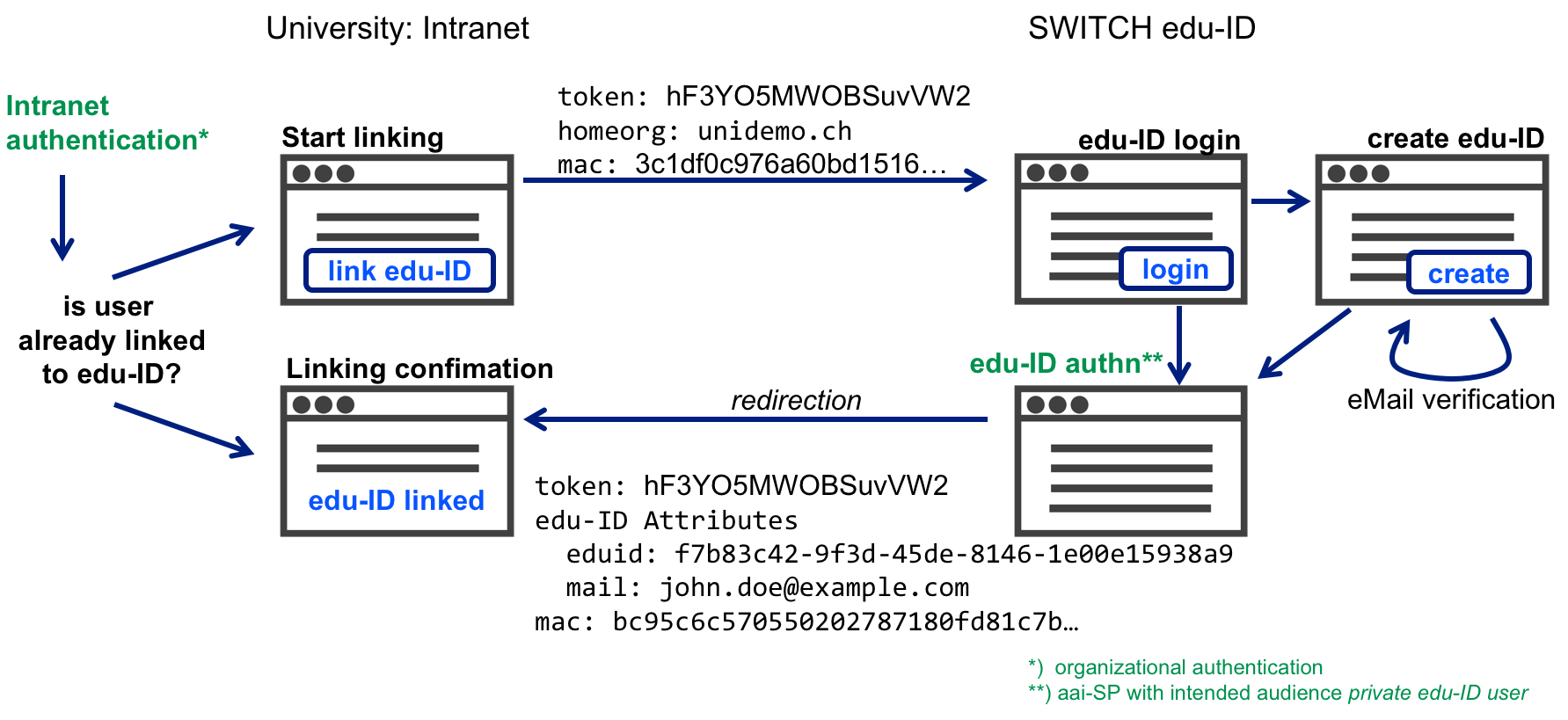
This linking approach is similar to the organizational linking service above. The main difference is that the web page (edu-ID authn) that requires authentication with edu-ID is hosted by Switch and not by the organization.
This approach may be preferable for organizations that don't want to operate a Sibboleth SP just for the linking service. The disadvantage compared to a proper SP is that the edu-ID login page can't be customized, and that the set of returned attributes is limited to the edu-ID identifier and the private e-mail address.
The detailed process how an organization can obtain the edu-ID identifier in this scenario is described here.
Switch edu-ID has a built-in linking service that can be used by organization members, who have an organizational e-mail address.
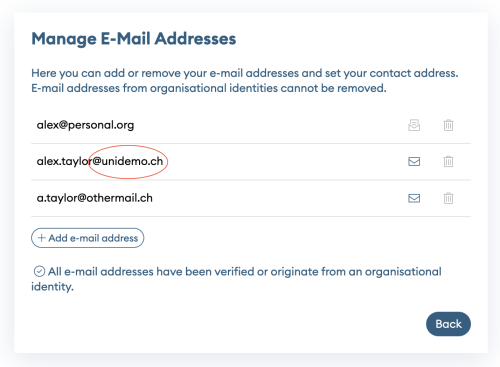
With this method, a user navigates to the my edu-ID account page eduid.ch and adds the organizational e-mail address. If an organization has been configured for this linking method, their e-mail addresses are recognized by matching a pattern like "*@university.ch". The e-mail address is used to fetch the according user record in the organizational directory, and a new current affiliation is created. The e-mail address is only used to create an initial affiliation. For all subsequent update processes another unique identifier is used.
With this method, the organizational identity is unidirectionally linked to the edu-ID identity. The organization does not have to implement a linking service.
To synchronize attributes, this linking method is compatible with pull with organizational attribute provider and pull with hosted attributed provider.
Details of mail-based linking with organisational e-mail are described here.
Switch edu-ID has a built-in linking service that can be used by organisations, which don't issue organisational e-mail addresses for all of their members. Instead, an organization stores the personal e-mail addresses of their members in its user directory.
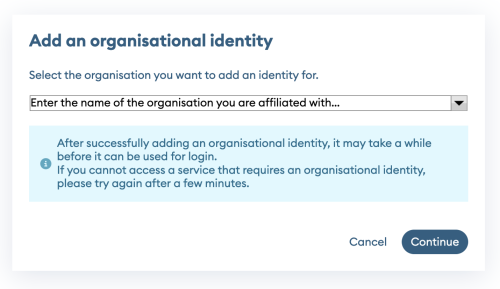
With this method, a user navigates to the my edu-ID account page eduid.ch and selects the organization to which a connection is to be established. If the selected organization has been configured for this linking method, then for each e-mail address of the user it is checked whether it is found in the directory of the organisation. If a matching e-mail address was found, it is used to fetch the according user record in the organizational directory, and a new current affiliation is created. The e-mail address is only used to create an initial affiliation. For all subsequent update processes another unique identifier is used.
With this method, the organizational identity is unidirectionally linked to the edu-ID identity. The organization does not have to implement a linking service.
To synchronize attributes, this linking method is compatible with pull with organizational attribute provider and pull with hosted attributed provider.
Details of mail-based linking with personal e-mail are described here.
Switch edu-ID has a built-in linking service that can be used by organization members, who have an organizational SWITCHaai account.
With this method, a user navigates to the edu-ID account management eduid.ch, goes to the 'Organisations' tab and selects 'add and organisational identity'. After choosing the organisation, the user is redirectedto the common AAI login page of the organisation. After successful authentication an edu-ID account is created based on the attribute information of the user's AAI account.
Note that this method can only be used by organizations who run their own IdP in the federation. Organizations who have integrated edu-ID and hence migrated their IdP into edu-ID can't use this linking method.
In the manual linking approach, an e-mail containing a user's edu-ID identifier is sent to HR, who has to manually add it to the organizational directory. It is divided into the following steps:
Advantages of this approach:
Drawbacks of this approach:
The registration page can be protected with an alphanumeric PIN code. HR should make sure that the PIN is only disclosed to persons who are supposed to use the registration service. To protect the registration page please contact us.