
Organisational Authentication Policy
A university may impose an authentication and mult-factor policy to its members. This can be done individually for each member by setting the attribute swissEduIDAffiliationSecurityPolicy in their linked affiliation.
The organisational authentication policy is interpreted as a minimum requirement. When a user accesses a service, the authentication policy of a university is combined with the policies of other universities, with the service's configuration and with the user's security settings to an effective policy as described here.
User attribute swissEduIDAffiliationSecurityPolicy
swissEduIDAffiliationSecurityPolicy is the attribute used as container storing various security related policies in affiliations. Its purpose is to make the organisation policies of a user accessible to the IdP. It is not to be used as SAML attribute or OIDC claim to be transmitted to services. However, just like other affiliation attributes, it is provisioned from an organisation to edu-ID using the push or pull method.
| Name | swissEduIDAffiliationSecurityPolicy |
|---|---|
| Description | Security criteria to be applied to various processes, especially the login process. Policy applicable per affiliation. |
| Vocabulary | JSON data containing the authentication criteria. Type of JSON data: AffiliationSecurityPolicy (see below) |
| OID | 2.16.756.1.2.5.1.1.2025 |
| # of values | single |
| Example values |
{ "mfaPolicy": { "mode": "enforced", "maxDeviceTrustDuration": "P30D", "allowedSecondFactorTypes": ["totp", "sms"] }} |
| Required |
No An absent attribute generally means that no policy is applied through this affiliation. The default values (or more restrictive ones, if specified by other policies) will be used during a user login. |
Specification of AffiliationSecurityPolicy JSON Data:
{ "mfaPolicy": { "mode": String,
"maxDeviceTrustDuration": String, "allowedSecondFactorTypes": Array.of(String) }}
At login time, every policy is taken into account and each field is considered independently from the others. Only the most restrictive setting for each field is considered.
To fall back to the default value, a field could either be set to null or be not declared.
mode: configures whether the user should always authenticate with MFA or not
enforced: Always require MFAoptional: Don't require MFA
Default value: optional
The setting optional means that the organisation does not enforce MFA to the user. If the user, however, accesses a service that enforces MFA, the user will have to set it up according to the policy defined in allowedSecondFactorTypes.
maxDeviceTrustDuration: sets the maximum duration of the "remember browser" feature.
- ISO 8601 time duration (e.g.
P7D): Maximum duration, independent of current SSO session. - A value of 0 is specified as
P0D(orPT0S), i.e. as a regular ISO 8601 time duration. Its meaning is: Don't enable and don't evaluate "remember browser" checkbox. Ask for the second factor if the current SSO session requires it.
Default value: 30 days (P30D)
allowedSecondFactorTypes: is a list of allowed 2-step login token types. Supported types/combinations:
["totp"]["totp","sms"]
Default value: all second factor types are supported (["totp","sms"])
Note: Setting this value to [] (empty list) strictly means "don't allow any second factor type" and is currently not supported.
Notes
Passkeys
Currently, only SMS or TOTP can be specified for allowedSecondFactorTypes.
The reason for this is that even if individuals use a passkey as MFA, they must configure a ‘traditional’ MFA method as a backup method. This also means that passkeys are always permitted as an MFA method and cannot be excluded by policy.
If passkeys alone were allowed as an MFA method, the risk of users losing their passkey and then contacting edu-ID support is considered to be too great.
Once passkeys are better known in the community and robust automatic recovery functions are in place, Switch will also allow passkeys as the sole MFA method.
Policy combination
A policy of an organisation can't generally disable MFA for any person. If a service enforces MFA, an organisation can not overrule this. Also, if User X has affiliations to Organisations A and B, then Organisation A can not weaken any MFA parameter from Organisation B.
Respectively, if a policy enforces MFA for a user, then the user will be always required to login with MFA, even when accessing services of other organisations.
For details refer to the documentation how the effective policy is determined.
User guidance
If the MFA settings of a user does not comply with the organisational policy, then they must update the MFA setting immediately upon the next edu-ID login.The following dialog will be shown in the user's preferred languange
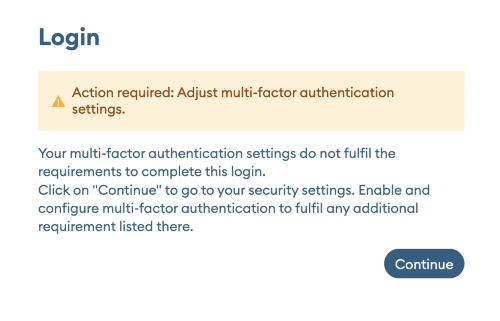 After clicking continue the user is guided through this flow:
- (only if the user has already configured MFA) Complete the MFA authentication.
Account management ignores an organisational policy, allowing for example a user having only SMS for MFA to set up TOTP or Passkey. - Go through the MFA wizard in the account management to set up MFA.
The MFA wizard will only display MFA options that are permitted by the organization. - Redirection back to the service the user actually wanted to access.
Affiliation change
The MFA settings for a user will not automatically change if they lose an affiliation. However, the user might have the chance to lower the MFA parameters or even disable MFA if no policy enforcing it is left.
Configuration examples
All these examples only show a single policy. Every setting can always be overridden by more restrictive policies imposed by other organizations/affiliations or by service or user settings.
Example 1:
{ "mfaPolicy": { "mode": "enforced", "maxDeviceTrustDuration": "P30D", "allowedSecondFactorTypes": ["totp"] }}MFA is enforced for all services the user accesses to. The user has to use an authenticator app (or similar program with TOTP support) as second factor. SMS is not permitted. An MFA session has a lifetime of 30 days on the same device.
Example 2:
{ "mfaPolicy": { "mode": "enforced" }}MFA is enforced for all services the user accesses to. The user may use SMS or an authenticator app (default) as second factor. An MFA session has a lifetime of 30 days (default) on the same device.
Example 3:
{}MFA is not enforced for this user by the organisation.