
Test Affiliations
Test affiliations allow users with a valid edu-ID test account to create, view, update, and delete organisational identities directly in the edu-ID Test account management. This feature is intended for testing and integration scenarios and is available only in non-production environments.
Note: This feature will be availalable only in April 2026!
What this feature is for
In test environments, many users need realistic organisational identity data to validate login flows, attribute release, role-based behavior, and service integrations. Test affiliations provide a simple way to manage this data without requiring organisation administrators for every test case.
Where it is available
- Available on the test environment only
- Not available in production
- Path to the form for creating test affiliations: https://test.eduid.ch/test-affiliation
How it works
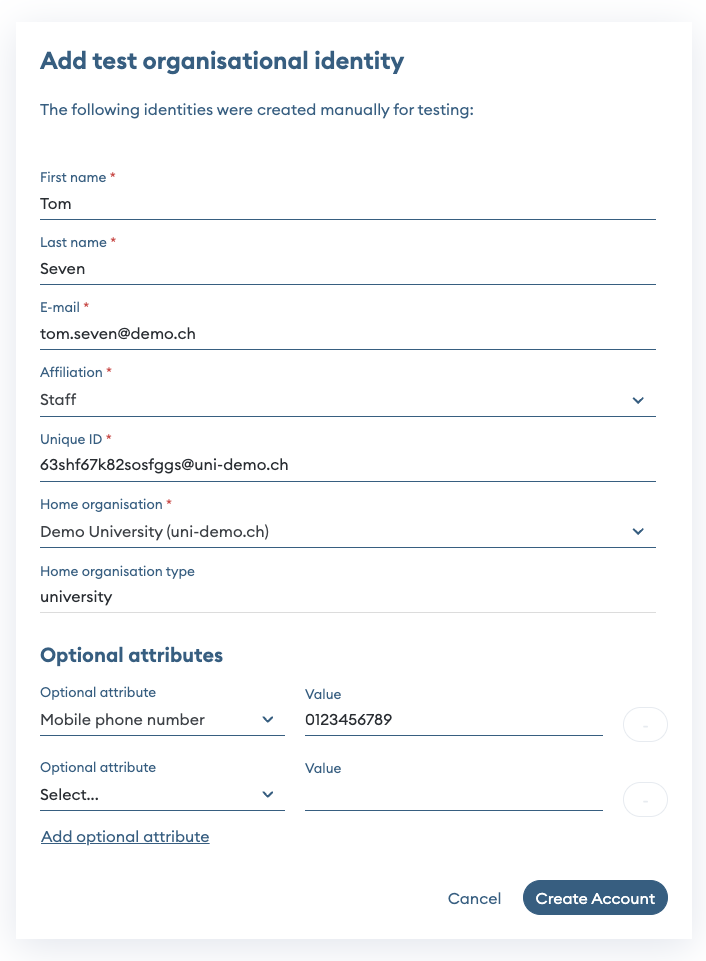
The feature is implemented in the edu-ID Test account management. One enters affiliation data in a web form, and the backend validates and then creates the affiliation for the currently logged in user.
What you can do
- Create a test affiliation
- Read affiliation details
- Update existing affiliation attributes
- Delete a test affiliation (i.e. make a current affiliation to a former)
Attributes required to create an affiliation
- Given name
- Surname
- Affiliation
- Unique ID
- Home organization
Optional attributes
All attributes supported by the Affiliation API can be provided as optional fields.
Form and input model
The form uses standard input components, including text fields and dropdown menus, to capture required and optional affiliation data.
Typical use cases
- Testing service behavior with student, staff, or mixed affiliation types
- Validating attribute mapping in connected applications
- Reproducing integration issues with controlled test data
- Preparing demonstration or QA scenarios without organisation-side provisioning changes